Showing posts with label tips. Show all posts
Showing posts with label tips. Show all posts
how to format/hard reset Samsung Galaxy Grand I9082
Turn your SAMSUNG GALAXY GRAND off.(SWITCH OFF)
PRESS AND HOLD VOLUME UP + Home Button + Power
Press and hold VOLUME UP and Home(center) button
Press Power until the phone vibrate
Wait until you see the Android logo then release all the buttons , the screen is likely this pic
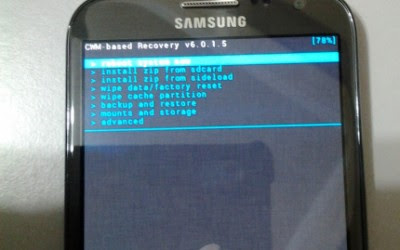 But this pic is of galaxy not 2....
then
(note:- Screen touch will not work in this mode so you can use VOLUME button to go up/down and HOME/POWER button for selection)
Select Wipe data/Factory reset with VOLUME DOWN, press Power (right hand-side)
Select YES -- delete all user data
Now the format process begins and it will be over within a minute....
after the above process you just have to select REBOOT NOW and your samsung galaxy grand will restart and a screen will appear asking your gmail account so connect through wi-fi while giving your email info...
Thank you .... for more updates on your device or any problem with the above process just comment it and it will be sort in no time.....
PRESS AND HOLD VOLUME UP + Home Button + Power
Press and hold VOLUME UP and Home(center) button
Press Power until the phone vibrate
Wait until you see the Android logo then release all the buttons , the screen is likely this pic

then
(note:- Screen touch will not work in this mode so you can use VOLUME button to go up/down and HOME/POWER button for selection)
Select Wipe data/Factory reset with VOLUME DOWN, press Power (right hand-side)
Select YES -- delete all user data
Now the format process begins and it will be over within a minute....
after the above process you just have to select REBOOT NOW and your samsung galaxy grand will restart and a screen will appear asking your gmail account so connect through wi-fi while giving your email info...
Thank you .... for more updates on your device or any problem with the above process just comment it and it will be sort in no time.....
How to: Take a screenshot on an iPhone/iPad/iPod Touch (with vdo)
i realize that many of you may already know how to do this, however, we’re here to serve all the newbies and experienced iOS users alike. Taking a screenshot on iPhone is really simple. Unlike some of its competitors’ phones, you do not need to download an app. The function is already built in to iOS and has been since day 1.

All you have to do is press the home key and the lock/power key at the same time. If your sound is on, you should hear the usual camera shutter noise, and your screen will flash white for a split second. Check your camera roll or Photo Stream and you’ll see your screenshot automatically saved. And that’s it. The same applies on iPad and iPod Touch. Pretty nifty huh?
All you have to do is press the home key and the lock/power key at the same time. If your sound is on, you should hear the usual camera shutter noise, and your screen will flash white for a split second. Check your camera roll or Photo Stream and you’ll see your screenshot automatically saved. And that’s it. The same applies on iPad and iPod Touch. Pretty nifty huh?
How To Take Screenshot in Galaxy Grand Duos I9082 (with vdo)
Hi friends its me sadixa.One of my friend got his first Android phone Galaxy Grand Duos.It comes with Android 4.1.2 and it gives great spec for the price. When exploring the features I am started with screen capture. On recent updates and phones Samsung gives better key combo to capture screen than before. Here is the simple method to take screenshot in Galaxy Grand Duos.
Update:
I was forget to include the Palm swipe method. Thanks Bayu Widyasanyata for mentioning it. Now the post updated with common Key combo and Palm swipe method.
HOW TAKE SCREEN SHOT IN GALAXY GRAND DUOS I9082 ?

Method 1 ( Key Combo Method )
1. Go to the desired screen you want to capture.
2. Now , simultaneously press and hold the Power and Home button for 2-3 seconds.
___________________________________________________

Method 2 ( Palm Swipe Method )
1. Go to Settings -> Motion ( Enable it if not enabled )
2. In Motion check Palm swipe to capture.
3. Now go to the desired screen you want to capture.
4. Finally Swipe your parm from right to left or left to right.
Thats it... both of the method above tested and works great.
To get the captured picture Go to Gallery -> Screenshots Or Go to /storage/sdcard0/Pictures/Screenshots using any file manager.
Update:
I was forget to include the Palm swipe method. Thanks Bayu Widyasanyata for mentioning it. Now the post updated with common Key combo and Palm swipe method.
HOW TAKE SCREEN SHOT IN GALAXY GRAND DUOS I9082 ?

Method 1 ( Key Combo Method )
1. Go to the desired screen you want to capture.
2. Now , simultaneously press and hold the Power and Home button for 2-3 seconds.
___________________________________________________
Method 2 ( Palm Swipe Method )
1. Go to Settings -> Motion ( Enable it if not enabled )
2. In Motion check Palm swipe to capture.
3. Now go to the desired screen you want to capture.
4. Finally Swipe your parm from right to left or left to right.
Thats it... both of the method above tested and works great.
To get the captured picture Go to Gallery -> Screenshots Or Go to /storage/sdcard0/Pictures/Screenshots using any file manager.
how to install "TUBEMATE" to ur mobile..
hi frends, whats up? its me IRIS.today m talking about a software of android supportable devices. if u r searching for a gud software to download desired mp4/flv vdoz n mp3 direct from youtube, it may b the best 1 4 u. there r lots software to download vdoz from youtube but all r useless. m talking about "TUBEMATE".download ur desired vdoz n u can watch them offline. its really a gud software for downloading youtube vdos.there lost of same named software but they dont work n it dosent install on ur devises.n one more thing u can find it on play store.. but they dont work .ok now m telling u about how install n use it.
if u want to download song only select the >> download as mp3<<
if u want to download song only select the >> download as mp3<<
to download n install it to ur android go to this link >> http://www.getjar.mobi/mobile/437056/tubemate-real<<
n download n install it..after installation open it n type the name of song of ur choice.

select ur desired one.

click on download .

select the frame size as per ur mobile .
note that ur vdo quality will depend on the frame size of ur vdo.if u downloaded 1280x720 its a gud quality to watch on pc n hd(hight difination) supportable mobile.but small mobile cant play this kinda vdo.. if u have small mobile or u want to transfer to another small mobile (such as nokia n others too) from bluetooth select the vdo frame size 320x240...

or if u want to download only song select the >> download as mp3 <<
n enjoy it..
tnq. if u had any kinda problem plz do not forget to comment below ..
How to Make Pizza Dough (vdo)

Skip running to the store or calling take out next time you have a fix, this pizza dough recipe takes just a few ingredients!
A Guide To Cleaning Your Computer With Vinegar (vdo)

This guide is a practical time-saver that will enable you to get good at computer basics, clean green, life hacks. Watch our short video on A Guide To Cleaning Your Computer With Vinegar from one of Videojug's professionals.
Top 5 Tips to make your Android Phones faster than before
If you have an android phone and it seems as if the phone worked fine when you bought it but now it has been sluggish recently, then thee tweaks apply to you. Most probably when your phone was launched, it did not have the Jelly Bean version of Android, however, after updating, it might be a little difficult for the processor to keep up with the updates. If that is the case, then here are some tips to speed up your processor just the way it was before.


- Keep your home screen optimized: filling up your home screen with a lot of widgets of even a live wallpaper will cause your phone to slow down and the extra memory will be used to keep things flowing, but not as smooth as you like. So to keep up, you might want to remove the extra widgets and change the live wallpaper to a much simpler one.

- Close the Apps that aren't used or even uninstall them: when you buy a new phone, it’s inevitable to install as much apps as possible and see what every one of them looks like. Well, it happens to everyone, so when you’re done with the “try out”, you might want to delete those apps and free up your phone memory. And if there are apps that you cannot live without, then you might want to keep an eye on them and make sure they’re closed when not in use, or maybe you could just download another app to close unnecessary apps, like Watchdog may be the fit for you. Moreover, it would be a nice move to install all your Apps onto the memory card.

- Use a different internet browser: with Gingerbread and older versions, a change in the browser will speed up your system dramatically. This is because the browser is only updated when the new OS version arrives. So it would be a nice fix to use Firefox app for Android. On the other hand if you’re using Android 4.0, you might want to check out the Google chrome browser, as it comes very handy. Opera mini is also a good pick and might even be the best choice from all browsers.
- Defragment the internal memory and clear the cache: this is an options that also works for your PC. Any system will benefit from having its internal memory defragmented and the cache cleared. This cleans the unwanted temporary files and fixes any data leaks. You can use Android Assistant for this purpose.

- Check for updates: there are a lot of other things that you can try out but one thing that will surely help, for every OS, is to check for updates and get the latest version. This will fix all the bugs and nasty glitches and even install new updates to your phone that you would definitely enjoy a lot more.